

The process of selecting the best laptop in Pakistan is not just about buying the most costly laptop or the brand that’s the most popular. There are various types of laptops available, and which ones are best for you will depend on your needs, budget, and the features that are most important for your work.
The perfect laptop can vary greatly from students to freelancing, programmers, business people, designers, content creators, and gamers. The aim must be to get the best performance, portability, reliability and price, rather than looking for a single “best laptop.”
How Do You Choose the Right Laptop?
To choose a laptop, first determine your workload and budget requirements, then look at CPU, RAM, SSD, GPU, display, battery life, portability, upgradeability and warranty. Lastly, shop or check the seller prior to making a purchase.
1. Start With Your Actual Workload
Before looking at HP, Dell, Lenovo, ASUS, Apple, or any other brand, ask one question:
What will I actually use the laptop for?
Your workload determines almost every other buying decision.
| User | Important Priorities |
|---|---|
| Student | Battery, portability, 8–16GB RAM, SSD |
| Office user | CPU, battery, keyboard, webcam, reliability |
| Freelancer | CPU, RAM, SSD, display, portability |
| Programmer | CPU, RAM, SSD, keyboard, display |
| Graphic designer | CPU, RAM, color-accurate display, GPU |
| Video editor | CPU, RAM, GPU, SSD, display |
| Gamer | Dedicated GPU, VRAM, CPU, cooling, high-refresh display |
| Business | Security, warranty, durability, manageability, support |
You do not have to use the same hardware to do your Microsoft Office work, to use the Internet, to take online classes, or to do research as you do to edit 4K video or to run virtual machines.
The importance: Purchasing high-end gaming equipment for your basic office work can waste a lot of your money, and the other way around will cause a big limitation in performance.
2. Set Your Budget Before Comparing Models
The budget should help you to pick out some options among the various laptops available in Pakistan.
Best laptop under 100,000 in Pakistan, best laptop under 150,000 and best laptop under 200,000 are good keyword search options, but they are not the only ones to take into account.
The differences in configuration, stock, import conditions, exchange rate, warranties and differences in the seller can cause prices of laptops to vary. Hence, don’t assume an advertised price is the eventual market price.
When comparing prices, make sure the machines have similar:
- Processor
- SSD capacity
- Operating system
A laptop with a lower price may simply have less RAM, a smaller SSD, a weaker display, or no official warranty.
3. Choose the Processor Carefully
While the CPU is indeed one of the most crucial parts of a laptop, the “Core i5” or “Core i7” designation isn’t conveying enough information.
The number of cores, threads, power class, architecture and exactly which model can all make a huge difference in performance and efficiency.
Modern options include:
- Intel Core
- Intel Core Ultra
- AMD Ryzen
- Apple M-series
- Snapdragon processors
You can also find U-series, H-series, HS-series and HX-series processors. These classifications may suggest differing priorities for efficiency, performance and power usage.
Core i5 vs Ryzen 5: Which Is Better?
The prize is not always issued to a single winner. Compare actual CPU models not just brand or level.
For instance a Core i5 that is older than a newer Ryzen 5 isn’t necessarily better, just because it is labeled as Core i5.
Buying rule: remember to specify the full processor model as that is the only accurate way to compare two laptops.
4. How Much RAM Do You Need?
For many modern users, 16GB is a practical target if the laptop will be used for multitasking, programming, professional work or several applications at once.
A simple framework is:
| Workload | Practical RAM Target |
|---|---|
| Basic browsing and office work | 8GB |
| General multitasking and study | 16GB |
| Programming and heavier creative work | 16–32GB |
| Professional editing, VMs and demanding workloads | 32GB+ |
However, don’t automatically pay for more RAM. Check whether the laptop allows future upgrades and whether the RAM is soldered.
For a developer, for example, 16GB with upgradeability may be more useful than an otherwise similar laptop with soldered memory.
5. SSD vs HDD: Storage Matters
Generally, an SSD is the preferred choice for the primary operating-system drive of a modern laptop over a conventional HDD. NVMe SSDs can offer rapid application start-up, access to files, and system responsiveness.
Is 512GB Enough?
512GB is a logical starting point for students, office users, programmers and even general users. For large video projects, games, photography libraries or professional datasets, users may require 1TB of storage or more.Think about future upgrading of the storage.
6. Do You Need a Dedicated GPU?
Not all users require a graphics card specifically for their use.
For most users, the integrated graphics should be more than enough for everyday use, work, surfing the web, programming, or simple productivity.
A dedicated GPU is more useful for:
- Modern gaming
- 3D rendering
- CAD and engineering workloads
- Professional video editing
- GPU-accelerated creative applications
- Other graphics-intensive workloads
Gaming laptops typically feature more powerful graphics cards (such as NVIDIA GeForce RTX or AMD Radeon) and have better cooling systems, higher processor speeds, and higher refresh rate displays.
Just don’t go for the gaming laptop that has high specs. A lighter business laptop could be more of a value if you’re mostly working with Word documents, Excel spreadsheets, a web browser, scheduling meetings and writing emails.
7. Don’t Ignore the Display
Two laptops can have similar CPU, RAM, and SSD specifications but feel completely different because of their displays.
Look beyond screen size and check:
- Resolution
- Brightness
- Color accuracy
- Refresh rate
- Panel technology
- Aspect ratio
- Viewing angles
Common technologies include IPS, OLED, and Mini-LED.
For office work, Full HD IPS may be perfectly adequate. Designers and photographers should pay more attention to color coverage such as sRGB or DCI-P3. Gamers may prioritize 120Hz or 144Hz refresh rates.
A beautiful OLED display can be valuable for creative work and entertainment, but it may not be worth paying extra if your main priority is basic productivity.
8. Battery, Weight, Ports and Build Quality
Performance is only part of the laptop experience.
If you travel frequently between university, office, home, or client meetings, portability matters. Check:
- Weight
- Battery capacity and real-world battery life
- Charger size
- USB-C
- USB-A
- HDMI
- Headphone jack
- Wi-Fi
- Bluetooth
- Webcam
- Keyboard
- Touchpad
For business users, USB-C docking support, security features such as TPM and biometric authentication, warranty, and repair turnaround can matter as much as raw processing power.
9. New vs Used: Which Should You Buy?
A new laptop generally offers clearer warranty coverage and lower risk, while a used or refurbished laptop can provide substantially stronger hardware for the same budget.
New laptop
Pros
- Lower wear
- New battery
- Better warranty clarity
- Lower hardware risk
Cons
- Higher price
- Lower specifications at the same budget
Used laptop
Pros
- Better hardware value
- Access to higher-end business machines
- Potentially better build quality for the price
Cons
- Battery degradation
- Hidden damage
- Unknown repair history
- Warranty limitations
- Refurbished or imported units may be incorrectly advertised
If buying used, never rely only on photographs.
10. How to Check a Used Laptop Before Buying
Use this checklist:
- Verify the exact CPU model.
- Check RAM and SSD capacity.
- Inspect battery health.
- Test the SSD’s health.
- Check the display for dead pixels or unusual brightness issues.
- Test the keyboard and touchpad.
- Test every important port.
- Check Wi-Fi and Bluetooth.
- Test the webcam and microphone.
- Inspect temperatures under load.
- Check the BIOS/UEFI for unusual locks.
- Verify the serial number.
- Confirm the charger.
- Ask whether the laptop is refurbished or imported.
- Get the warranty and return terms in writing.
Tools such as Windows System Information, Device Manager, battery reports, BIOS/UEFI information, HWiNFO or similar hardware-monitoring utilities can help verify a machine’s actual configuration.
11. Which Laptop Brand Is Best?
There is no single brand that is best for everyone.
HP, Dell, Lenovo, ASUS, Acer, MSI, and Apple each have different product families designed for different users.
Instead of asking only “HP vs Dell vs Lenovo,” compare the specific laptop.
For example:
- Business user: prioritize durability, security, keyboard, support, and warranty.
- Student: prioritize price, battery, portability, and sufficient performance.
- Gamer: prioritize GPU, VRAM, cooling, CPU, and display refresh rate.
- Designer: prioritize display quality, RAM, CPU, GPU, and color accuracy.
The model and configuration matter more than the logo on the lid.
12. Consider AI PCs and NPU Hardware
Newer laptops increasingly include an NPU (Neural Processing Unit) designed to accelerate certain AI workloads efficiently.
You may see terms such as:
- Copilot+ PC
- Intel Core Ultra
- Snapdragon X
- Apple Silicon
An NPU can be useful for supported AI features, but don’t buy an AI PC simply because the term appears in the advertisement. First confirm that the software and features you actually use benefit from it.
13. What About Business and B2B Laptop Buying?
Businesses should evaluate more than specifications and purchase price.
For multiple employees, consider:
- Standardized configurations
- Warranty coverage
- Device management
- Repair turnaround
- Docking compatibility
- Replacement availability
- Bulk purchasing
- Lifecycle planning
- Total cost of ownership
A slightly more expensive business laptop may be the better choice if it reduces downtime and simplifies support across a company’s device fleet.
14. Where Should You Buy a Laptop in Pakistan?
Whether you buy from an online retailer, authorized dealer, local computer market, or refurbished seller, verify the seller before paying.
Depending on the city, buyers may encounter markets such as Hafeez Center in Lahore, Hall Road in Lahore, Blue Area in Islamabad, or Saddar area computer markets.
Availability and seller quality can vary, so the same verification principles apply everywhere.
Before purchasing, confirm:
- Exact configuration
- Final price
- Invoice
- Return policy
- Serial number
- Product condition
- Charger
- Windows activation
- Whether the machine is new, used, refurbished, open-box, or imported
15. Final Laptop Buying Checklist
Before you pay, ask:
- Does this laptop match my workload?
- Is the exact CPU model current enough for my needs?
- Is 16GB RAM preferable for my workload?
- Is the SSD large enough?
- Do I actually need a dedicated GPU?
- Is the display suitable for my work?
- Is battery life adequate?
- Is it portable enough?
- Can RAM or storage be upgraded?
- Is the price reasonable compared with identical configurations?
- Is the warranty genuine?
- Is the seller trustworthy?
- Have I checked the exact specifications?
The best laptop is ultimately the one that satisfies your workload without making you pay for performance you don’t need.
5 FAQs
1. How much RAM is enough for a laptop in 2026?
8GB can handle lighter everyday tasks, but 16GB is a more practical target for many users who multitask, study, program, or work professionally. Heavy editing, virtual machines, and demanding workloads may justify 32GB or more.
2. Is Core i5 good enough for a laptop?
Yes, a Core i5 can be excellent for many workloads, but the exact generation and model matter. Don’t compare laptops using only “Core i5” or “Core i7.” Check the complete processor model and its performance class.
3. Is 512GB SSD enough?
For many students, office users, programmers, and general users, 512GB is sufficient. If you store large games, videos, photographs, or professional projects locally, consider 1TB or a laptop with expandable storage.
4. Should I buy a used laptop in Pakistan?
A used laptop can offer excellent value, particularly when buying a well-built business model, but the condition must be verified. Check battery health, SSD health, display, ports, thermals, serial number, charger, BIOS status, and warranty or return terms.
5. Which is better: HP, Dell or Lenovo?
None is universally better. Compare the specific models, configurations, warranty, build quality, display, performance, upgradeability, and price. A good Lenovo may be better for one buyer, while a particular Dell or HP may be better for another.
Conclusion
The right laptop should begin with what you need to do and how much you can afford to spend, not a brand name or a “cool” laptop that’s on a product page.
The logic for most buyers should be: Figure out your use case, then fix a realistic budget, then select the appropriate processor, RAM and storage needs, and if you require a dedicated GPU, then the type of display and battery, and finally which processor, storage, dedicated GPU, display and battery it will support and the seller’s reputation and warranties, and what exact configuration you are looking for.
When purchasing for studying or office purposes, consider usefulness and reliability. When programming and freelancing, consider these factors: CPU power, RAM, speed of the SSD, portability and battery life. If you are into gaming and creative work, look for sustained performance, display quality, thermals, and the performance of GPUs.
Most of all, don’t think that the more expensive laptop is the best laptop. The optimum machine is the one that will provide you the performance, reliability, features and support that you require and for the price you’re willing to pay.

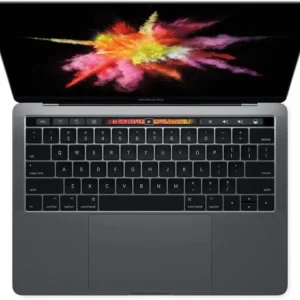 Apple MacBook Pro A1706 2017 | 13.3" Retina | Core i5 3.1GHz | 16GB | 256GB | Touch Bar | Grade A
 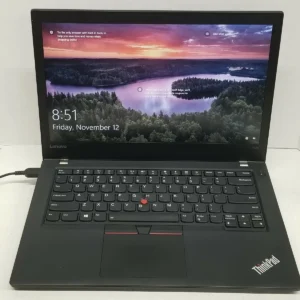 Lenovo ThinkPad T470 | 14" Display | Core i7 7th Gen | 8GB RAM | 256GB SSD | Touch | Grade A
 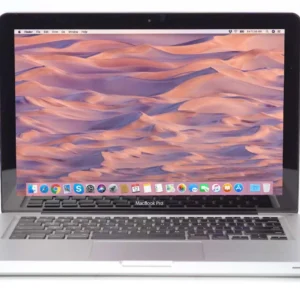 Apple MacBook Pro A1278 2011 | 13.3" LED | Core i5 2.3GHz | 8GB | 256GB SSD | Grade A